Showing posts with label Desktop Stuff. Show all posts

Saturday, 24 August 2013

Water Illusion ScreenSaver 4.50


Watch and enjoy living nature scenes of the best places on earth! Watch and enjoy our high quality living nature screensaver performing the best places on earth including waterfalls, lakes, beaches, forest, and much more. Well, it's like you are having a luxurious mini-vacation without leaving your desk! Our screensaver is a pleasure for all users. The breathtaking images become a way to break-away from daily stress and tension at home or in the office, we have focused on details to provide you with the most realistic environment achievable. Furthermore you can also make your own animated scenes out of your photos using Nature Illusion Studio and enjoy it in Nature Illusion Screensaver. Be pampered with a huge collection of living nature sceneries from our FREE gallery which you can add it easily to your screensaver playlist. Our gallery is one of the largest collection of living nature screensaver on the net, thanks to our users who have contributed and shared their creations to our gallery.
Create professional screensavers for fun or business with this fully customizable screensaver creator. With Water Illusion ScreenSaver, you can create free or shareware screensavers with a user registration feature in just a few steps. It comes with Nature Illusion Studio to make animated pictures, GUI Designer to design the look-and-feel (skin) of your screensaver window, and Installer Builder to make your screensaver ready for distribution.
Features:
• A wide variety of living nature sceneries.
• Playlist feature to manage pictures that you want to play.
• Use your own music files (mp3,wma,mid) as a background music.
• Weather effects (rain and snow)
• Change your wallpaper automatically with Auto-Wallpaper setting.
• 100+ transition effects.
• Add hundred more living scenes from Nature Illusion Gallery
What's New in version 4.50:
    * Name changed from Water Illusion Screensaver to Nature Illusion Screensaver
    * New user interface
    * Adding picture from gallery now have a preview option


Size: 6.30 MB

Download Trial:


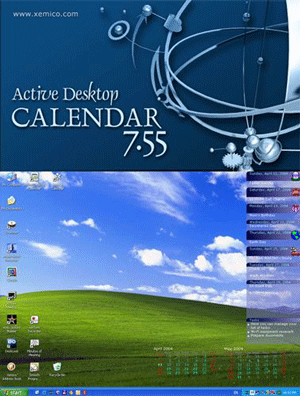
Active Desktop Calendar 7.92 Build 100421


Active Desktop Calendar is fully customizable calendar features notes, tasks, alarms, and displays its data on your desktop through blending with existing wallpaper. You can organize your data in layers and share them with other people on a local area network. The program can integrate with Outlook and show its appointments and tasks on the desktop. If you synchronize your PDA device (Pocket PC, Palm, smartphone) with Outlook then through this connection you also get a synchronization with PDA as a side effect.
There are options for changing calendar icons, fonts and colors, marking weekdays of choice and marking dates with notes and/or alarms. You can have a text only version of the calendar and choose between displaying one, two or three months on the desktop. Recurrence patterns are available for both notes and alarms. An alarm can be stand alone or attached to a note.
You can set each note to normal, private or invisible desktop view. Private notes are displayed as generic text reminder and invisible notes are not displayed at all. Printing calendar data is easy and includes an option to choose date range for printing notes.
Special desktop pictures option allows you to add some of your pictures to existing desktop background. Comma separated values .CSV format is supported for data export and import. Tablet PC users should not worry as the program detects desktop orientation changes automatically. Finally, Active Desktop Calendar comes with world clock screen saver that shows your computer's system time, plus five major time zones around the world.
Features:
• Blends data with desktop wallpaper
• Calendar, notes, tasks, alarms, contacts
• Many recurrence patterns for notes/alarms
• Interactive desktop interface
• Fully customizable (icons, fonts, colors)
• Data export/import/print (CSV, iCal)
• Included preset calendars with holidays
• Detects Tablet PC desktop orientation
• Dual/multi monitor systems supported
• Group calendar data in layers
• Share data layers on a local area network
• Direct connection with Outlook®
• Google® calendar support
• Automatic data backup
• Many icons available for marking notes
• Native 64-bit version available
Supported OS:  Windows 2000/XP/Vista/W7


What is new in Active Desktop Calendar 7.9:
"Set Tasks Title" option
- This new option allows you to change the title for the tasks section in the Notes/Tasks Bar on the desktop. The default title is "Tasks" and you can now make it anything else you want. The option is available in the "Settings – Notes/Tasks Bar" dialog box.
Size: 4.74 MB

Download for 32-bit

Download for 64-bit

Friday, 8 March 2013

Free Download Enterprise Screensaver


For Download Enterprise Screensaver Click On Download Button


Download K Button Par CLick Karny K Bad Is Picture K Step Follow Karo

Free Download Mogical Star Time Screen Saver


For Download Mogical Star Time Screen Saver Click On Download Button

Free Download Lovely Folders


Download Lovely Folders And Change Any Folder Icon With New Designs And Colors
You Can Also Change Any Folder Background  And Much More Option In It
For Download Lovely Folders Click On Download Now Button
Copyright 2011-2013.jStTrickS.BLOGSPOT.Com. Powered by Blogger.

About Us

Recent Gallery

Image and video hosting by TinyPic

Disqus for Jsttricks

Advertisements